This website uses cookies. By clicking Accept, you consent to the use of cookies. Click Here to learn more about how we use cookies.
Turn on suggestions
Auto-suggest helps you quickly narrow down your search results by suggesting possible matches as you type.
Showing results for
- Extreme Networks
- Community List
- Network Management & Authentication
- ExtremeControl
- Re: ExtremeControl EAP Group Mappings, match on si...
Options
- Subscribe to RSS Feed
- Mark Topic as New
- Mark Topic as Read
- Float this Topic for Current User
- Bookmark
- Subscribe
- Mute
- Printer Friendly Page
ExtremeControl EAP Group Mappings, match on signing CA?
ExtremeControl EAP Group Mappings, match on signing CA?

Anonymous
Not applicable
Options
- Mark as New
- Bookmark
- Subscribe
- Mute
- Subscribe to RSS Feed
- Get Direct Link
- Report Inappropriate Content
03-06-2022 08:13 AM
Hi,
As of 8.5.3 ExtremeControl has the ability to use multiple RADIUS certificates using EAP Group Mappings.
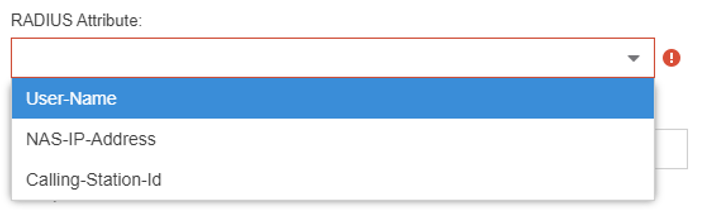
The determination of those certificates is done using EAP Group Mappings via the exchange of RADIUS packets to look at User-Name, NAS-IP-Address (Switch IP) or Calling-station-id (MAC Address), as per below:
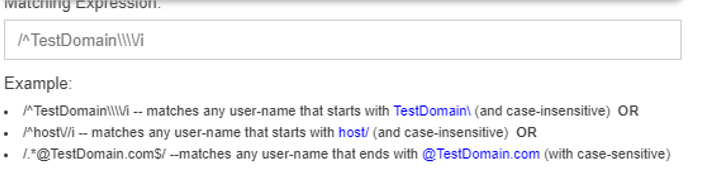
You can then use a POSIX regular expression to find a match:
In my case there are two different certificate authorities, some clients will be signed by one, others will be signed by another. This is part of a migration to a new PKI. The issue here is that the only real distinction between client certificates presented to ExtremeControl will be the signing CA.
So the domain, user and NAS IP's in the RADIUS exchange are all going to be the same.
Is there a way to create a filter based on certificate signing CA, or something else I might be able to hook into to make the distinction?
Many thanks in advance.
As of 8.5.3 ExtremeControl has the ability to use multiple RADIUS certificates using EAP Group Mappings.
The determination of those certificates is done using EAP Group Mappings via the exchange of RADIUS packets to look at User-Name, NAS-IP-Address (Switch IP) or Calling-station-id (MAC Address), as per below:
You can then use a POSIX regular expression to find a match:
In my case there are two different certificate authorities, some clients will be signed by one, others will be signed by another. This is part of a migration to a new PKI. The issue here is that the only real distinction between client certificates presented to ExtremeControl will be the signing CA.
So the domain, user and NAS IP's in the RADIUS exchange are all going to be the same.
Is there a way to create a filter based on certificate signing CA, or something else I might be able to hook into to make the distinction?
Many thanks in advance.
4 REPLIES 4
Anonymous
Not applicable
Options
- Mark as New
- Bookmark
- Subscribe
- Mute
- Subscribe to RSS Feed
- Get Direct Link
- Report Inappropriate Content
03-07-2022 01:59 PM
Hi Mig,
Great, understood.
Thanks again.
Cheers,
Martin
Great, understood.
Thanks again.
Cheers,
Martin

Options
- Mark as New
- Bookmark
- Subscribe
- Mute
- Subscribe to RSS Feed
- Get Direct Link
- Report Inappropriate Content
03-07-2022 11:19 AM
Hi Martin,
The RADIUS will make a choice based on the commonName in the certificate.
If both PKIs are giving the same name, you'll not be able to discriminate on this parameter.
An alternative could be to present a public certificate (the CA Root should be in all the devices) during the migration and switch after that.
If the clients are windows devices, you can manage the authentication parameters via GPO and push both private Root CA.
Concerning the AAA, yes you ca upload both Root CA and the RADIUS will choose the one corresponding to the client certificate.
Regards
Mig
The RADIUS will make a choice based on the commonName in the certificate.
If both PKIs are giving the same name, you'll not be able to discriminate on this parameter.
An alternative could be to present a public certificate (the CA Root should be in all the devices) during the migration and switch after that.
If the clients are windows devices, you can manage the authentication parameters via GPO and push both private Root CA.
Concerning the AAA, yes you ca upload both Root CA and the RADIUS will choose the one corresponding to the client certificate.
Regards
Mig
Anonymous
Not applicable
Options
- Mark as New
- Bookmark
- Subscribe
- Mute
- Subscribe to RSS Feed
- Get Direct Link
- Report Inappropriate Content
03-07-2022 10:29 AM
Hi Miguel,
Thank you posting a reply so quickly, and thank you for the added detail.
Also thank you for you patience if my understanding is incorrect.
So here is the scenario I am thinking of, which is based on computer authentication using EAPTLS.
Two clients connect the same switch using a certificate with the same FQDN (due to migration), but have been signed by different PKI's.
Based on that information and the available RADIUS fields of Username (maybe just or PEAP) and NAS-IP address, these would be the same for each client, so what criteria could be used to make the distinction?
If each client has installed only the root and intermediates that belong to its own PKI, it becomes critical that the right NAC / RADIUS certificate is returned / presented to the client - hence back to what criteria to use?
In regards to AAA configuration, which is used to validate the client certificate / authentication, do you know if I can install root and intermediate certs for each of the PKI's in the same place?
That way the client certificate presented to NAC will be able to chain automatically against the right ones?
Many thanks,
Martin
Thank you posting a reply so quickly, and thank you for the added detail.
Also thank you for you patience if my understanding is incorrect.
So here is the scenario I am thinking of, which is based on computer authentication using EAPTLS.
Two clients connect the same switch using a certificate with the same FQDN (due to migration), but have been signed by different PKI's.
Based on that information and the available RADIUS fields of Username (maybe just or PEAP) and NAS-IP address, these would be the same for each client, so what criteria could be used to make the distinction?
If each client has installed only the root and intermediates that belong to its own PKI, it becomes critical that the right NAC / RADIUS certificate is returned / presented to the client - hence back to what criteria to use?
In regards to AAA configuration, which is used to validate the client certificate / authentication, do you know if I can install root and intermediate certs for each of the PKI's in the same place?
That way the client certificate presented to NAC will be able to chain automatically against the right ones?
Many thanks,
Martin
Options
- Mark as New
- Bookmark
- Subscribe
- Mute
- Subscribe to RSS Feed
- Get Direct Link
- Report Inappropriate Content
03-07-2022 03:10 AM
Martin,
There should be some misunderstanding on the feature.
The EAP Group Mapping will define which certificate will be presented by the RADIUS server based on the Username/NAS-IP/MAC.
The authentication as such will be performed with the info available in the AAA config. No need to play here with the EAP Groups:
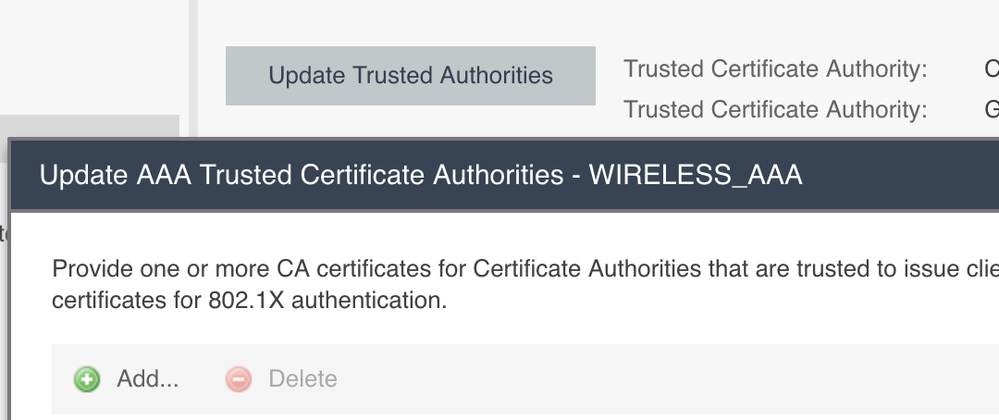
You need the EAP Groups if the client is validating the RADIUS certificate.
The purpose is to present a specific RADIUS certificate.
I use the following use case:
I the check the Usernames like "host/computername.private-domain.local" for computer authentication and the via the EAP Group I check the username and I present a RADIUS certificate that was issued by a Root-CA available on the specific computer.
You can request the users to log-in with something like [email protected] to ensure that you'll present an acceptable RADIUS certificate for the client.
If non of the EAP Group is matching, the default RADIUS certificate is presented
The default RADIUS is presenting a certificate from a public authority. It is usually a star certificate (for example *.public-domain.com).
I must use this because the BYOD devices do not have any Root CA from private PKI by default.
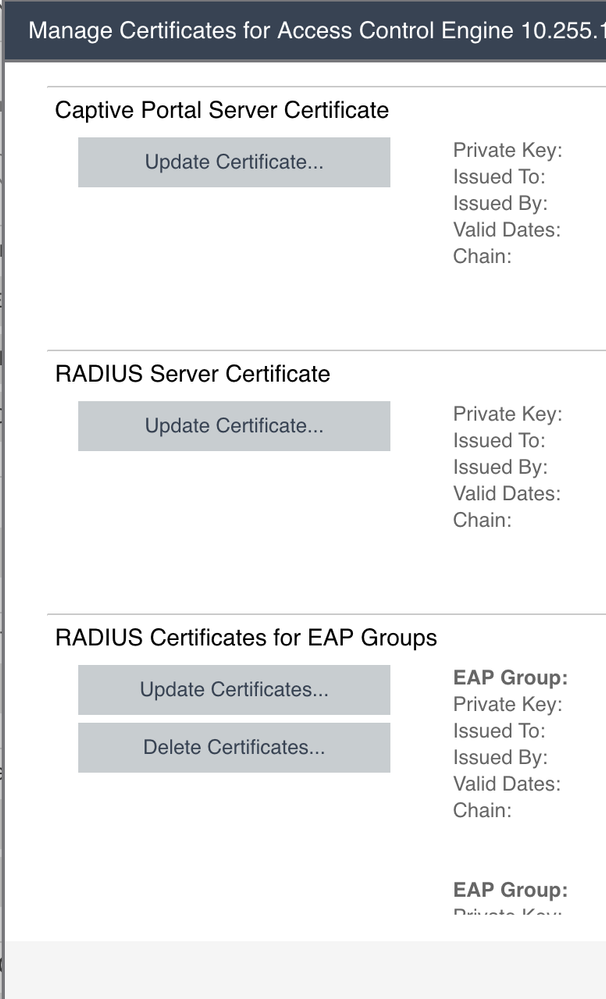
I upload this certificate in the "RADIUS Server Certificate"
Hope this help.
Mig
There should be some misunderstanding on the feature.
The EAP Group Mapping will define which certificate will be presented by the RADIUS server based on the Username/NAS-IP/MAC.
The authentication as such will be performed with the info available in the AAA config. No need to play here with the EAP Groups:
You need the EAP Groups if the client is validating the RADIUS certificate.
The purpose is to present a specific RADIUS certificate.
I use the following use case:
I the check the Usernames like "host/computername.private-domain.local" for computer authentication and the via the EAP Group I check the username and I present a RADIUS certificate that was issued by a Root-CA available on the specific computer.
You can request the users to log-in with something like [email protected] to ensure that you'll present an acceptable RADIUS certificate for the client.
If non of the EAP Group is matching, the default RADIUS certificate is presented
The default RADIUS is presenting a certificate from a public authority. It is usually a star certificate (for example *.public-domain.com).
I must use this because the BYOD devices do not have any Root CA from private PKI by default.
I upload this certificate in the "RADIUS Server Certificate"
Hope this help.
Mig

