This website uses cookies. By clicking Accept, you consent to the use of cookies. Click Here to learn more about how we use cookies.
Turn on suggestions
Auto-suggest helps you quickly narrow down your search results by suggesting possible matches as you type.
Showing results for
- Extreme Networks
- Community List
- Switching & Routing
- ExtremeSwitching (EXOS/Switch Engine)
- Re: EXOS Packet Capture
Options
- Subscribe to RSS Feed
- Mark Topic as New
- Mark Topic as Read
- Float this Topic for Current User
- Bookmark
- Subscribe
- Mute
- Printer Friendly Page
EXOS Packet Capture

Options
- Mark as New
- Bookmark
- Subscribe
- Mute
- Subscribe to RSS Feed
- Get Direct Link
- Report Inappropriate Content
05-18-2021 01:00 PM
Hello,
today I played around with the built-in packet capture of EXOS ( How To: How to perform a local packet capture on an EXOS switch | Extreme Portal (force.com) )
I’m able to capture packets and open the pcap file with wireshark, but I only see the following packets:
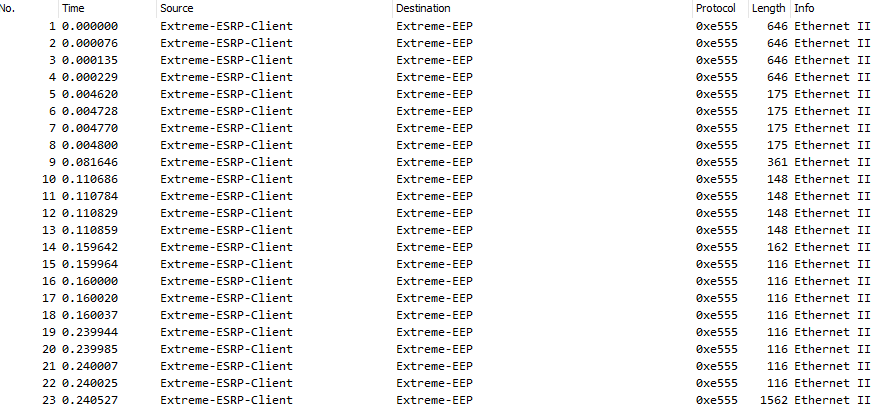
Wondering if I’m doing something wrong or if the feature is something else than I’m thinking. Any hints?
Best regards
Stefan
Solved! Go to Solution.
2 ACCEPTED SOLUTIONS

Options
- Mark as New
- Bookmark
- Subscribe
- Mute
- Subscribe to RSS Feed
- Get Direct Link
- Report Inappropriate Content
05-18-2021 03:54 PM
Hi,
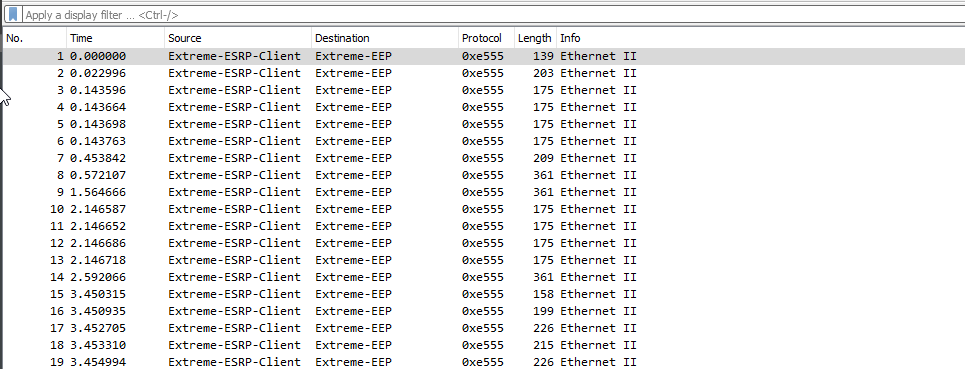
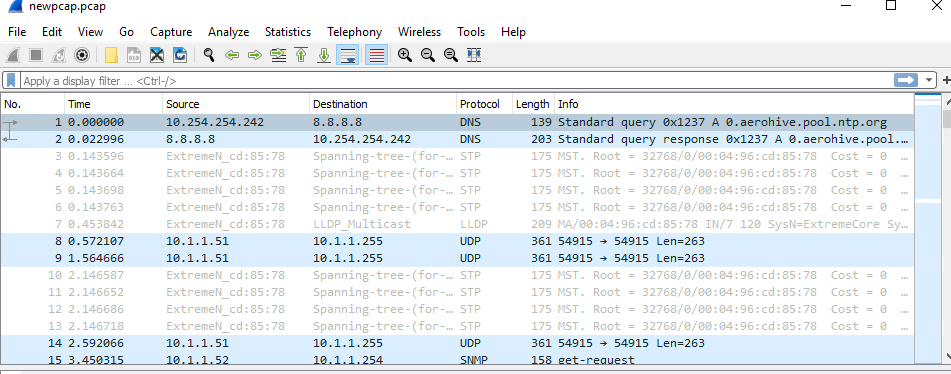
You can use the editcap tool to remove the first 52 bytes. Mine looked something like below from Powershell:
PS C:\Program Files\Wireshark> .\editcap.exe -C 52 editcap.pcap newpcap.pcap

syntax below:
PS C:\Program Files\Wireshark> .\editcap.exe -C 52 <original pcap filename> <new pcap filename>
Below is more on editcap:
https://www.wireshark.org/docs/man-pages/editcap.html
Before:
After:
Thanks,
Chris Thompson

Options
- Mark as New
- Bookmark
- Subscribe
- Mute
- Subscribe to RSS Feed
- Get Direct Link
- Report Inappropriate Content
07-21-2026 09:42 PM - edited 07-21-2026 09:43 PM
This is an interesting question because the built-in packet capture feature can be a bit confusing at first. If you're only seeing those packets in Wireshark, it may be related to the capture point, applied filters, or hardware offloading rather than the traffic itself. Checking the interface configuration and testing with a known traffic Gomovies flow could help narrow down the cause. I'd be interested to know what the final solution was, as it could be useful for anyone troubleshooting EXOS packet captures in the future.
24 REPLIES 24
Options
- Mark as New
- Bookmark
- Subscribe
- Mute
- Subscribe to RSS Feed
- Get Direct Link
- Report Inappropriate Content
03-13-2026 09:12 PM - edited 03-13-2026 09:12 PM
It sounds like the packet capture itself is working since you’re able to export the Cineby pcap file and open it in Wireshark. In many cases with EXOS, seeing only a limited set of packets usually means the capture point or filter is restricting what the switch mirrors to the capture process. By default, the built-in capture may only see traffic that is processed by the CPU (control-plane traffic) rather than all data-plane traffic passing through the ports.
Options
- Mark as New
- Bookmark
- Subscribe
- Mute
- Subscribe to RSS Feed
- Get Direct Link
- Report Inappropriate Content
02-16-2026 07:36 PM - edited 02-16-2026 07:36 PM
t sounds like the packet capture itself is working since you’re able to generate the pcap file and open it in Wireshark. If you’re only seeing a very limited set of packets Wooflix (for example control-plane traffic like ARP, STP, LLDP, etc.), then it’s likely not a malfunction but rather how the built-in capture on ExtremeXOS (EXOS) is designed to operate.
Options
- Mark as New
- Bookmark
- Subscribe
- Mute
- Subscribe to RSS Feed
- Get Direct Link
- Report Inappropriate Content
05-18-2021 05:51 PM
Hi Stefan,
You bring upa good point(Stefan 1, Chris 0) so that article has been updated:
How To: How to perform a local packet capture on an EXOS switch | Extreme Portal (force.com)
Thanks again,
Chris Thompson
Options
- Mark as New
- Bookmark
- Subscribe
- Mute
- Subscribe to RSS Feed
- Get Direct Link
- Report Inappropriate Content
05-18-2021 05:13 PM
Hi Chris,
this worked like a charm, thank you very much! How much “trouble” some 52 bytes can cause… 🙂
Maybe this little information can be added to the GTAC articles?
Best regards
Stefan
Options
- Mark as New
- Bookmark
- Subscribe
- Mute
- Subscribe to RSS Feed
- Get Direct Link
- Report Inappropriate Content
05-18-2021 03:54 PM
Hi,
You can use the editcap tool to remove the first 52 bytes. Mine looked something like below from Powershell:
PS C:\Program Files\Wireshark> .\editcap.exe -C 52 editcap.pcap newpcap.pcap

syntax below:
PS C:\Program Files\Wireshark> .\editcap.exe -C 52 <original pcap filename> <new pcap filename>
Below is more on editcap:
https://www.wireshark.org/docs/man-pages/editcap.html
Before:
After:
Thanks,
Chris Thompson

