This website uses cookies. By clicking Accept, you consent to the use of cookies. Click Here to learn more about how we use cookies.
Turn on suggestions
Auto-suggest helps you quickly narrow down your search results by suggesting possible matches as you type.
Showing results for
- Extreme Networks
- Community List
- Switching & Routing
- ExtremeSwitching (EXOS/Switch Engine)
- Re: PTPv1 packets are not propagating across the s...
Options
- Subscribe to RSS Feed
- Mark Topic as New
- Mark Topic as Read
- Float this Topic for Current User
- Bookmark
- Subscribe
- Mute
- Printer Friendly Page
PTPv1 packets are not propagating across the switches
PTPv1 packets are not propagating across the switches

Options
- Mark as New
- Bookmark
- Subscribe
- Mute
- Subscribe to RSS Feed
- Get Direct Link
- Report Inappropriate Content
06-18-2026 07:23 PM
I found this information: “If AVB is also in use on this switch, with Dante traffic passing over the same links, see: PTPv1 packets are dropped when gPTP is enabled on a port” Is this right?
https://extreme-networks.my.site.com/ExtrArticleDetail?an=000063026&q=dante
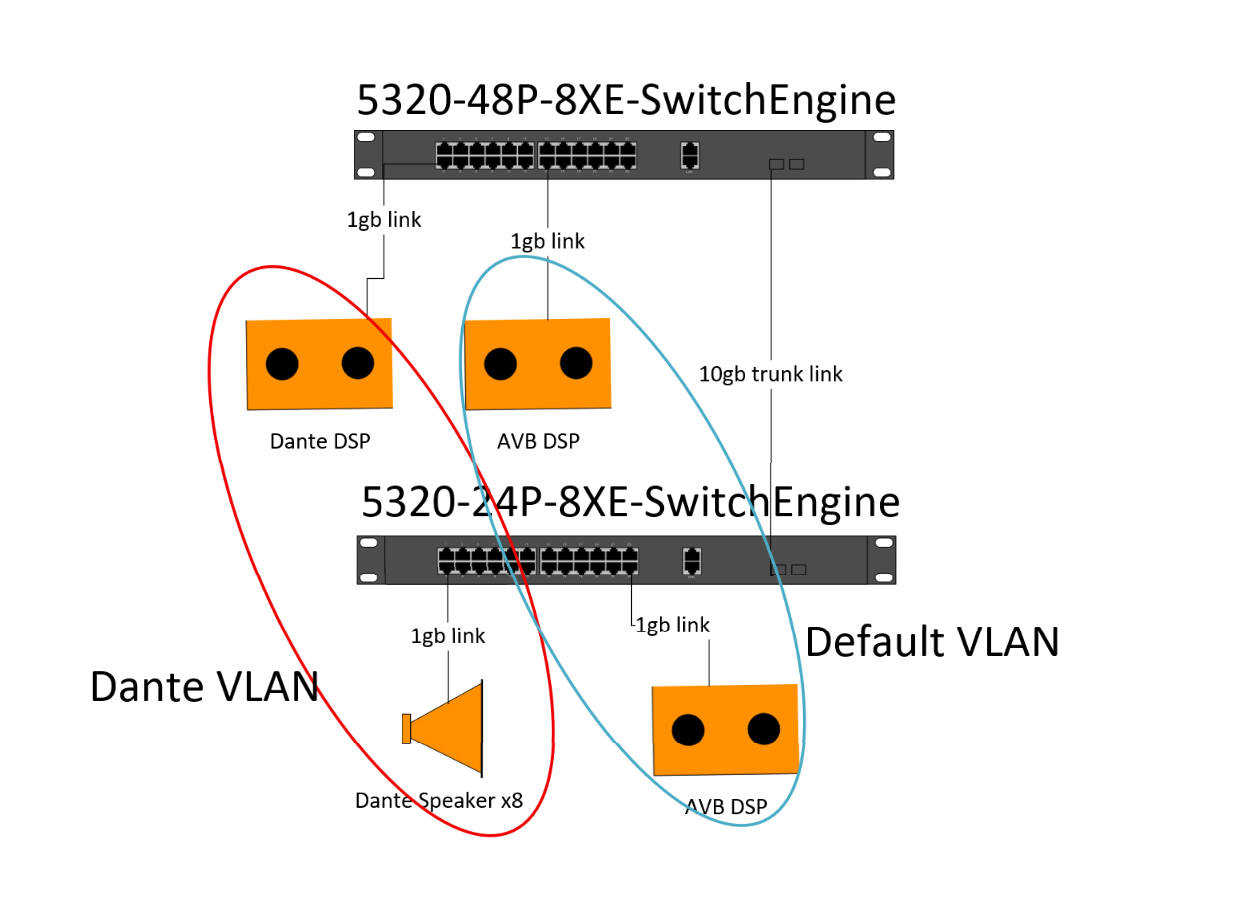
I have several 5320 switches for an AV setup. I have two VLANs set up. First for AVB. Second for Dante.
- gPTP is enabled
- IGMP is enabled
- snooping is enabled
- Querier is set to the 48-port switch
PTP appears to be working on the 24-port switch, as it selects a device as the master clock. The issue is that the DSP connected to the 48-port switch does not participate in the process and elects itself as the master clock.
Anyone able to assist with this setup?
1 REPLY 1

Options
- Mark as New
- Bookmark
- Subscribe
- Mute
- Subscribe to RSS Feed
- Get Direct Link
- Report Inappropriate Content
06-30-2026 01:38 AM
Hello,
>> I found this information: “If AVB is also in use on this switch, with Dante traffic passing over the same links, see: PTPv1 packets are dropped when gPTP is enabled on a port” Is this right?
This issue has been fixed ~2018 and related to the "xos0067493 PTPv1 packets are dropped on the port if GPTP is enabled on the same port."
Please check the article below, with log events described there it might be easier to identify the root cause
https://extreme-networks.my.site.com/ExtrArticleDetail?an=000077379&q=gptp
Another useful output in your case is:
"show network-clock gptp port <PORT_NUMBER>"

